🕐 --:--
-- --
عاجل
⚡ عاجل: كريستيانو رونالدو يُتوّج كأفضل لاعب كرة قدم في العالم ⚡ أخبار عاجلة تتابعونها لحظة بلحظة على خبر ⚡ تابعوا آخر المستجدات والأحداث من حول العالم
⌘K
AI مباشر | -- مشاهد مباشر
910,352 مقال 401 مصدر نشط 228 قناة مباشرة 4,823 خبر اليوم
آخر تحديث: منذ 3 ثواني

Three ways to clear iPhone storage from messages you probably have not tried yet

تكنولوجيا
Gulf News
2026/04/29 - 13:25 508 مشاهدة
تحليل ذكي | AI Editorial Analysis

Dubai: Your iPhone keeps telling you storage is almost full.

You delete a few apps, maybe clear some photos, and somehow it fills back up again within weeks.

The problem might not be what you think.One of the biggest storage drains on an iPhone is sitting quietly inside your Messages app.

هذا الخبر من Gulf News. خبر يقدم أدوات ذكاء اصطناعي للتلخيص والترجمة والاستماع.

Dubai: Your iPhone keeps telling you storage is almost full. You delete a few apps, maybe clear some photos, and somehow it fills back up again within weeks. The problem might not be what you think.

One of the biggest storage drains on an iPhone is sitting quietly inside your Messages app. Every photo, video, GIF and file anyone has ever sent you is saved automatically, whether you wanted it or not. Group chats, family threads, memes from months ago, all of it accumulates in the background without you ever noticing. Tom's guide has shared 3 hacks on how to deal with it.

1. Delete your large attachments in one go
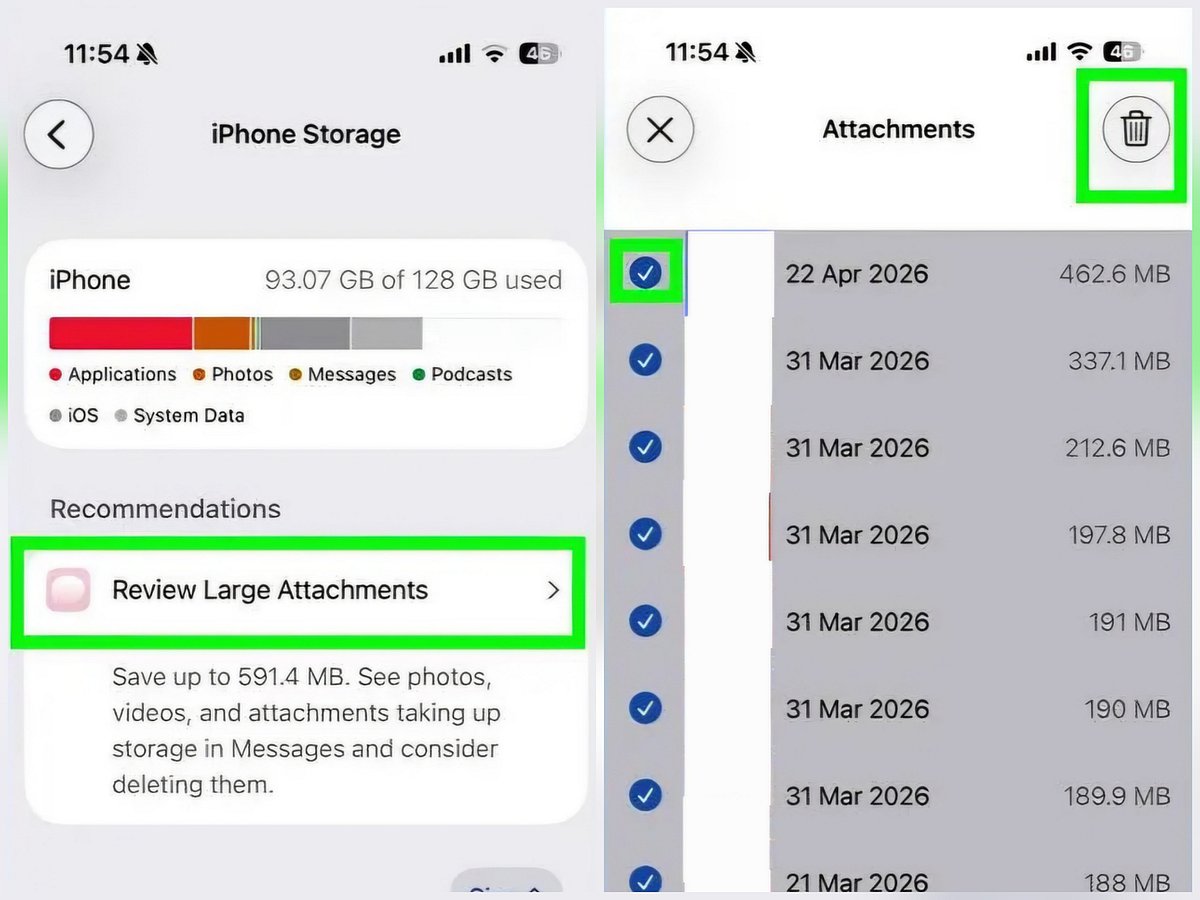
Review and delete large attachments

Your iPhone has already done the hard work of finding the biggest offenders. Go to Settings, then General, then iPhone Storage. Scroll down to Recommendations and tap Review Large Attachments. You will see everything stored in your Messages app sorted by file size, photos, videos, GIFs and documents, all in one place. Swipe left to delete individual items or tap Edit in the top right corner to select and remove several at once. If you are in active group chats, check this list regularly because storage builds up faster than you would expect.

2. Clear out specific conversations
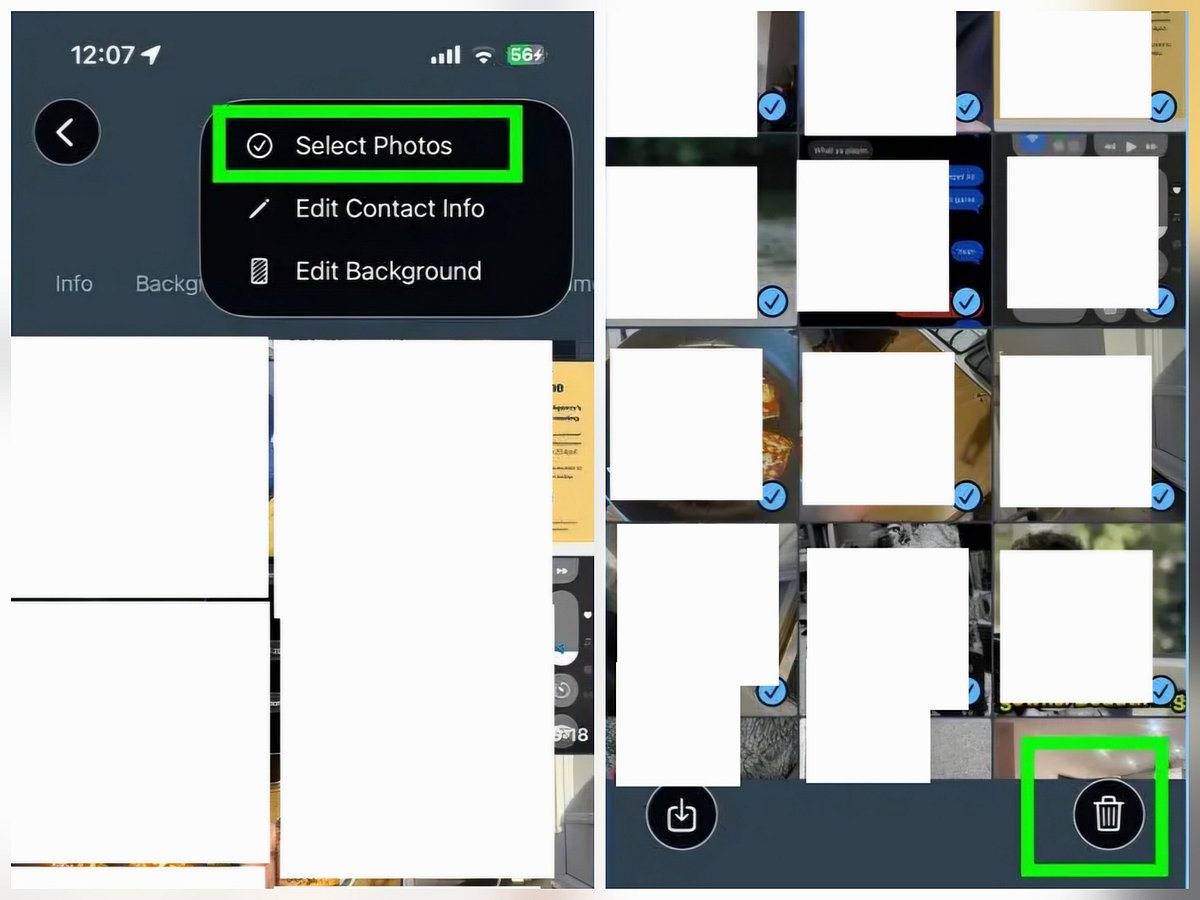
Clear photos from specific conversations

If you already know which chats are the messiest, you can go straight to the source. Open Messages, select the conversation and tap the contact or group name at the top of the screen. From there, select Photos to see every image exchanged in that thread, or Links to find files and other attachments. Tap Edit, choose what you want gone and delete. This works especially well for family group chats, work threads and any conversation where someone has a habit of forwarding videos.

3. Set messages to auto-delete
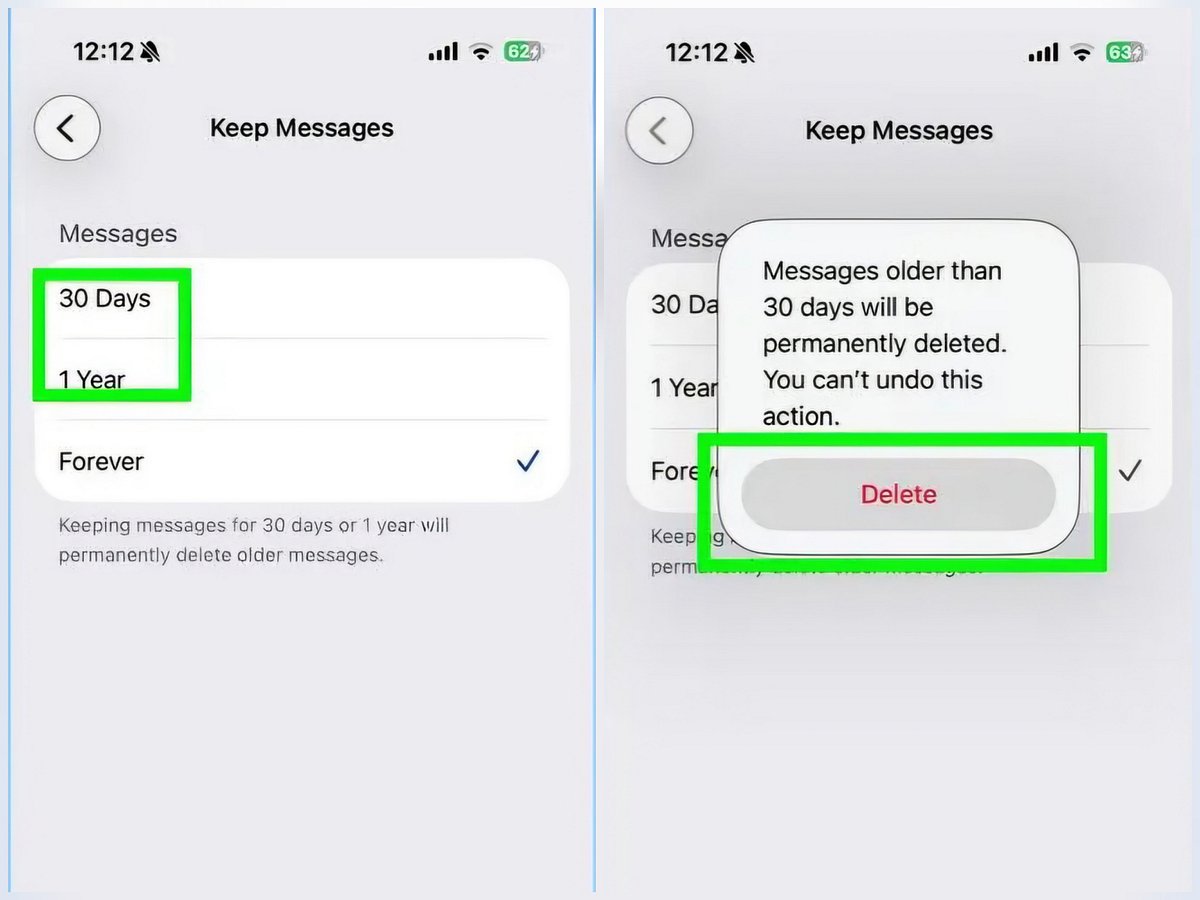
Auto-delete messages

The most low-effort fix is to stop the problem from building up again. Go to Settings, then Messages, then Keep Messages. You can set your phone to automatically delete messages after 30 days or one year rather than keeping them forever. When you first change this setting, your iPhone will ask if you want to delete everything older than your chosen timeframe straight away. If storage is your priority, say yes.

Get updated faster and for FREE: Download the Gulf News app now - simply click here.

المصدر: Gulf News | Source: Gulf News

ملاحظة تحريرية | Editorial Note: نُشر هذا المقال في الأصل بواسطة Gulf News. خبر (Khabr) هي منصة إعلامية أردنية مرخّصة تعمل بالذكاء الاصطناعي. نضيف قيمة تحريرية من خلال: تحليل ذكي للأخبار، ملخصات تلقائية، رواية صوتية بالذكاء الاصطناعي، ترجمة متعددة اللغات، وتدقيق الحقائق. هدفنا جعل الأخبار أكثر وضوحاً وسهولةً للقارئ العربي.

This article was originally published by Gulf News. Khabr is a licensed Jordanian AI-powered news platform (Registration #82086). We add editorial value through: AI-powered news analysis, automated summaries, AI audio narration, multi-language translation (Arabic, English, French, Turkish), and AI fact-checking. Our mission is to make news more accessible and understandable for Arabic-speaking audiences worldwide.

مشاركة:

المزيد عن تكنولوجيا | More on Technology

هذا الخبر ضمن تغطية خبر لقسم تكنولوجيا. نقدّم لك تحليلات ذكية وملخصات يومية لأهم الأخبار من مصادر موثوقة متعددة. المصدر: Gulf News. يوجد 6 مقالات مرتبطة بهذا الموضوع.

This article is part of Khabr's coverage of Technology. We provide AI-powered analysis, summaries, and multi-source aggregation to keep you informed. Source: Gulf News. Tags: iPhone, storage, tips.

مقالات ذات صلة

AI
يا هلا! اسألني أي شي 🎤
🔍
FREE Free 1GB Internet + Free International Calls

$1 trial — eSIM in 190+ countries — No roaming charges

Download Free